How to reactivate your Nevlin subscription? (Resume membership)
If you previously canceled your subscription or allowed it to expire, you can reactivate it at any time to regain full access to your daily lessons, tools, and learning progress.
Steps to reactivate your subscription:
- Open the Nevlin app or sign in at https://nevlin.com/
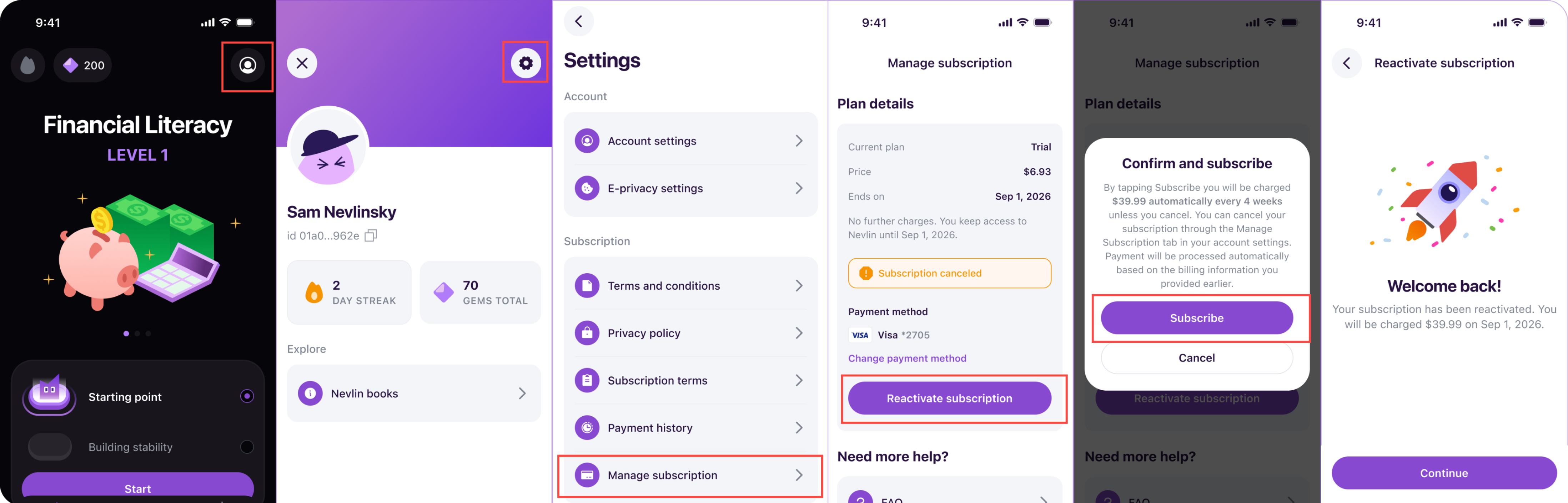
- Go to your Profile by tapping the Profile Icon in the Home Page.
- Tap the gear icon at the top of the page to open Settings.
- Select a Manage Subscription.
- Tap Reactivate Subscription.
- Review your plan details and tap Confirm and Subscribe to complete the reactivation.
What happens after reactivation:
Your account will be restored immediately, allowing you to pick up right where you left off. All your saved course progress completed chapters, and historical streak of records remain intact.
If you experience any issues while reactivating to your subscription, contact us at support@nevlin.com or by submitting a ticket to the Support Center.
Was this article helpful?