How to cancel your Nevlin subscription? (Unsubscribe guide)
You can cancel your subscription at any time directly through your account settings.
Steps to cancel your subscription:
- Log in to your account at https://nevlin.com/
- Open the Profile section by tapping the Profile tab.
- Tap the gear icon to open Settings.
- Select a Manage Subscription.
- Tap Cancel Subscription and follow the prompts to confirm.
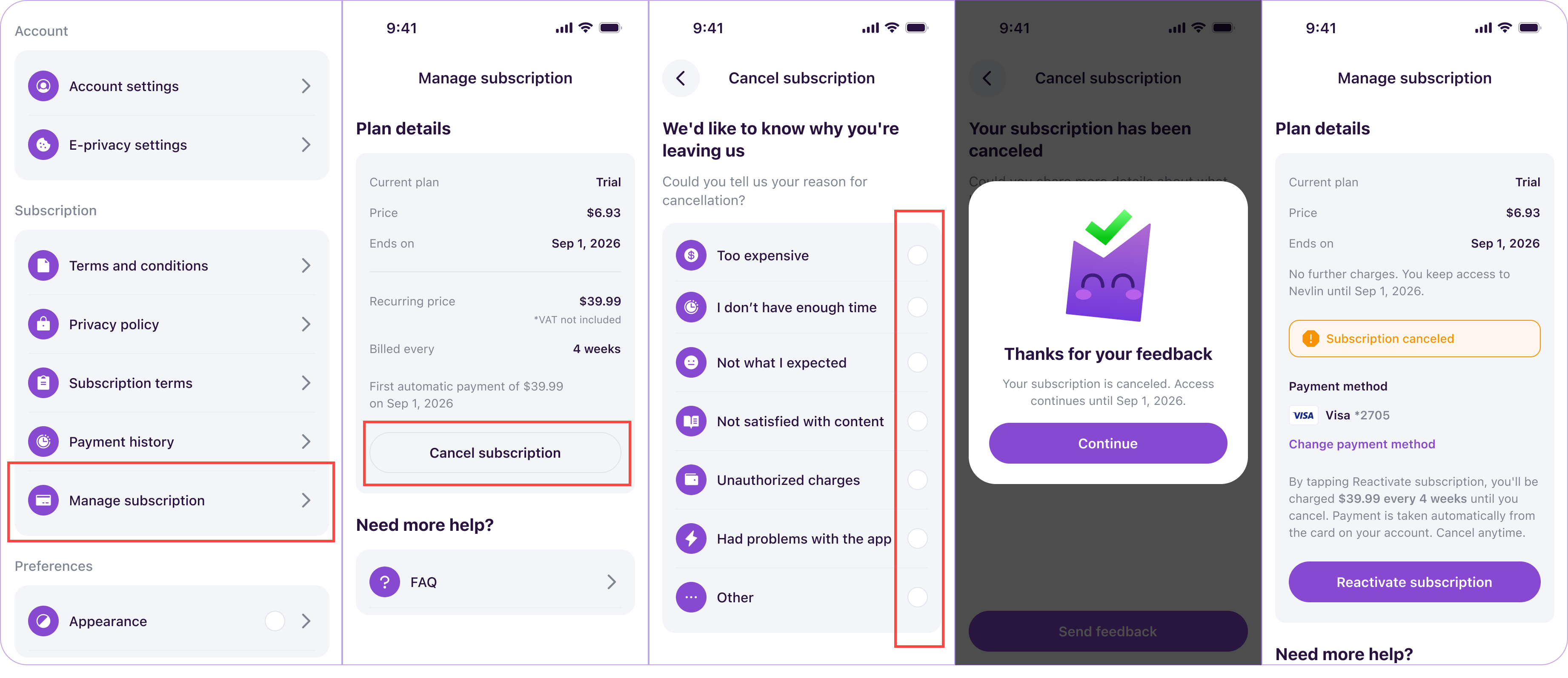
What happens after you cancel:
Your subscription auto-renewal will be turned off immediately, and you will not be charged again. You keep full access to all course materials, daily lessons, and tools until the end of the billing period you have already paid for.
Need help cancelling?
If you prefer, you can submit a ticket to our support team asking us to cancel your subscription for you. Our team will process the cancellation from our side, so you do not have to click through anything.
If you experience any issues cancelling your subscription, contact us at support@nevlin.com or by submitting a ticket to the Support Center.
Was this article helpful?