How can I delete my personal data and account? (Data erasure)
You can request the deletion of your Nevlin account and personal data directly in the app or by contacting our Support team.
Deleting your account in the app:
To request account and data deletion from within the app:
- Open the Nevlin app and go to Profile -> Settings -> Account Settings -> Delete My Account.
- Confirm your deletion request.
- Check your inbox for a confirmation email and click the "start the deletion" link inside to proceed.
Please note that if you do not click the "start the deletion" link inside the email, the deletion process will not be initiated and your account will remain active.
Deletion request limit: You can submit a deletion request once every 30 days.
Requesting deletion by email:
Alternatively, you can submit a deletion request via email:
- Send an email to privacy@nevlin.com requesting account and data erasure.
- Make sure to write from or include the exact email address linked to your Nevlin account. Our team will handle the request and send confirmation once complete.
Please note that we cannot delete partial data (such as removing only credit card details while keeping the account active). Requesting account deletion will erase all associated information across both web and mobile app platforms, including personal details, login credentials, and learning progress. 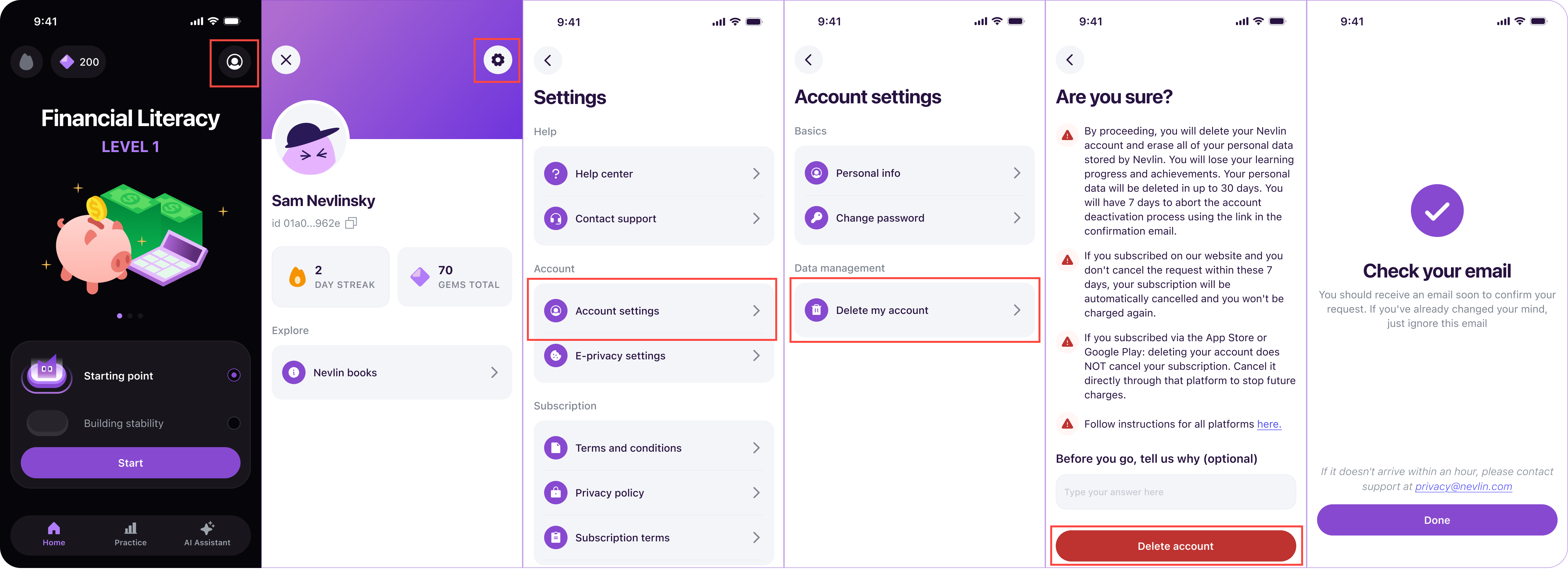
If you experience any issues deleting your account, contact us at support@nevlin.com or by submitting a ticket to the Support Center.
Was this article helpful?